
AI Board Secretary
Ask your AI Board Secretary. Review the draft. Keep the board moving.
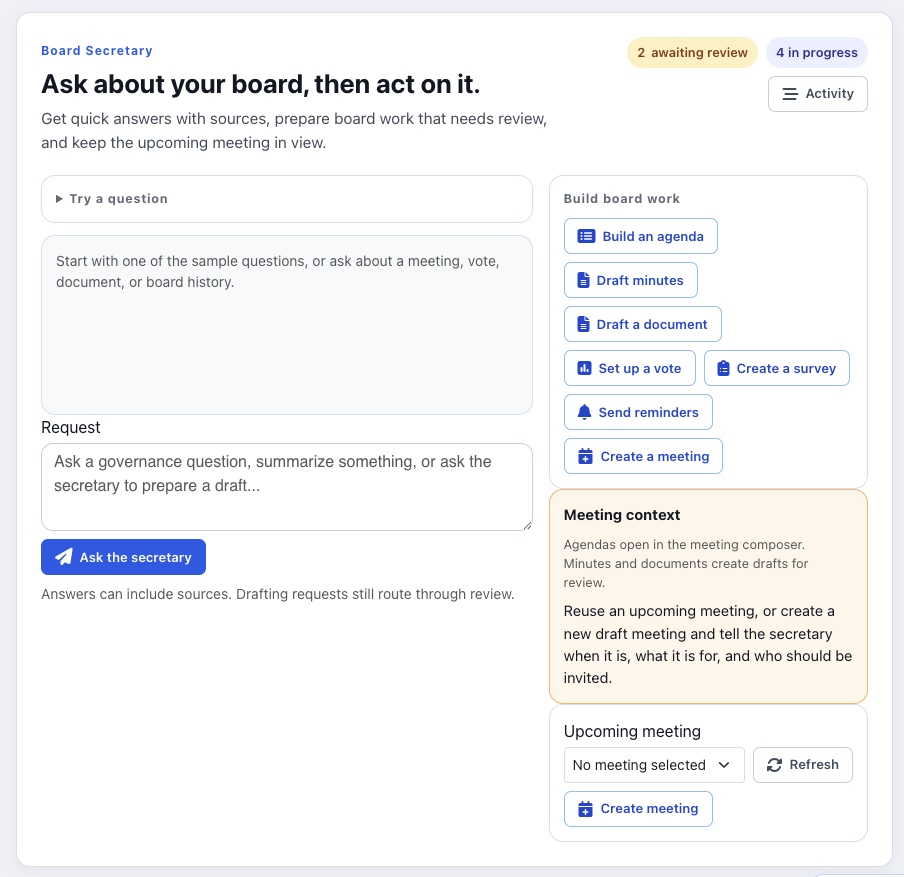
BoardSite’s AI Board Secretary works from your board’s real record, not a blank page. It drafts the work, you review and approve, and the board keeps moving. A human is in the loop on every output.
Product walkthrough
See the AI Board Secretary turn a meeting into a reviewable record.
A real BoardSite workflow, from meeting intelligence to a human-approved result.
What it does
Five practical ways to keep board work moving.
Build the agenda
Start every meeting from your last one. The AI Board Secretary drafts the agenda from prior meetings and open action items, so nothing carries over by accident or gets forgotten.
Advanced + Board OSTurn meetings into minutes
Turn your meeting into reviewable minutes, key decisions, motions with vote tallies, and action items, ready to approve. Review, edit, and approve before anything becomes part of the official record.
Advanced + Board OSTrack action items
Every action item is captured, assigned, and carried forward until it’s closed, so follow-ups stop falling through between meetings.
Advanced + Board OSAsk it anything
Your board’s full history becomes answerable. Ask in plain language and get an answer drawn from your actual record, scoped to each user’s permissions.
- “When did we last approve the budget?”
- “Which action items are still open from the last two meetings?”
- “What did the Governance Committee recommend last year?”
- “Where is the final version of the conflict-of-interest policy?”
- “Did we vote on renewing the contract?”
- “What should a new board member read before the next meeting?”
Draft documents
Draft first-pass resolutions, policy updates, and board communications from your board’s context, then review and finalize. The board reviews and approves; the AI never finalizes governance records on its own.
Board OSPermission-aware
The AI Board Secretary works from your board memory while respecting roles, committees, and document access. It answers from the board record, scoped to each user’s permissions, so people see only what they’re allowed to see.
Not a generic notetaker
Generic board portals store files. Generic AI notetakers summarize calls. Neither can tell you what the board approved last quarter, whether a motion passed, which action items are still open, which version of a policy is final, or how today’s discussion fits years of board history. BoardSite starts with the board record, and the AI works from it.
What you get on each plan
Standard
No AI features. Standard is the complete board portal for meetings, records, members, and committees.
Advanced
Smart Meetings and Meeting Intelligence. Draft agendas from prior minutes, record and transcribe meetings, prepare reviewable minutes, and extract action items.
Board OS
The full AI Board Secretary. Assign it board work, monitor the board between meetings, and draft documents with human review, so the board keeps moving forward.
Before the meeting
Smart Meetings: build the next meeting from the last one.
The AI Board Secretary uses prior minutes, open work, and the documents you choose to prepare a reviewable agenda, not a generic outline disconnected from your board.
Document intelligence
Bring forward relevant minutes and working documents so the draft begins with the board’s actual context.
Purpose-built meeting structures
Start with a board, committee, annual, strategic-planning, emergency, or training-meeting structure, then tailor it.
Unfinished business carried forward
Open decisions, follow-ups, and action items can return to the next agenda instead of disappearing between meetings.
Action-item extraction
Identify commitments in the record and turn them into assignable follow-up items for human review.
Practical time allocation
Draft realistic time blocks around the meeting type and agenda complexity, then adjust them before publishing.
A draft you control
Reorder, rewrite, add, or remove anything. The AI prepares the first pass; your team approves the meeting.
After the meeting
Meeting Intelligence: turn the recording into reviewable minutes.
Upload the meeting recording and receive a structured first draft with the discussion, decisions, motions, and follow-up work organized for human review.
Recording upload
Add a completed meeting recording and let processing continue while your team moves on to other work.
Structured transcript and minutes
Organize the discussion into reviewable minutes aligned to the meeting and its agenda.
Decisions and vote outcomes
Surface motions, decisions, and recorded outcomes so they can be checked before becoming part of the official record.
Action items with context
Pull out commitments, responsible people, and follow-up details for review and assignment.
Meeting participation context
Connect speakers and attendance context to the draft without treating AI output as the final attendance record.
Review and approval workflow
Designated people edit and approve the draft before minutes are published to the board’s record.
AI output is a draft. Your authorized reviewers confirm accuracy, make edits, and approve the record before publication.
Questions & answers
AI Board Secretary questions
What BoardSite AI can prepare, which plans include it, and how data access works.
What can BoardSite's AI prepare?
Advanced can draft an agenda from prior minutes, turn a recording into a transcript and reviewable minutes, and extract action items. Board OS adds briefs, cross-meeting follow-through, document drafting, and an assignable AI Board Secretary.
What is the difference between Advanced AI and the AI Board Secretary?
Advanced focuses on the work surrounding an individual meeting. The full AI Board Secretary in the coming-soon Board OS works across meetings and documents, maintains continuity, and supports approval workflows.
Can BoardSite answer questions from our board history?
Board Chat in Board OS can answer questions from the meetings, decisions, votes, documents, and action items a user is authorized to access. Answers are grounded in the board’s own record rather than general internet content.
Does the AI respect committee and document permissions?
Yes. BoardSite applies existing access rules before retrieving content. AI does not expand a person’s access or reveal information from restricted committees, folders, or meetings.
Is our board content used to train AI models?
BoardSite does not use customer board content to train models. Its AI runs through Cavendo Engine and sends necessary content to contracted model providers under commercial terms that exclude training on customer content. See the Security page for current retention and processing details.