
Committees
Your committees work hard. Give them the tools they need.
Committee pages include the same tools as the full board: meetings, votes, and documents.
Product walkthrough
Give every committee a complete, private workspace.
Committee meetings, votes, documents, and members remain organized without losing the connection to the full board.
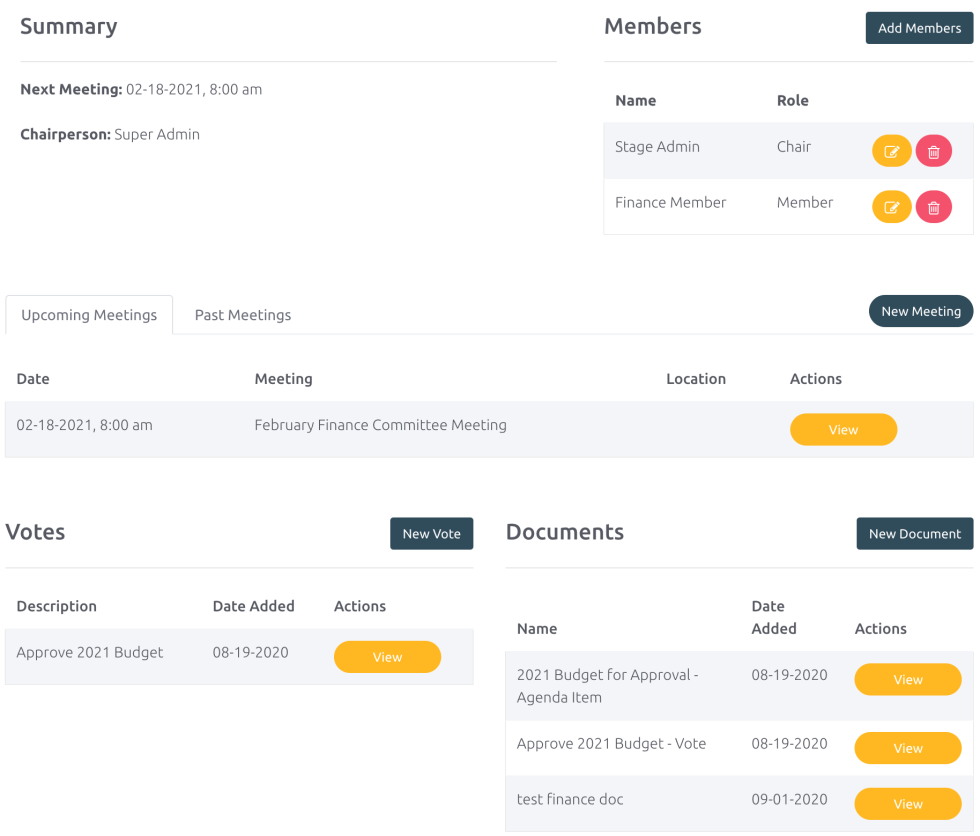
Committees are where a lot of the work between board meetings gets done. In BoardSite, committees get the same tools as the full board: their own meetings, votes, and documents.
Access and “need to know” are central to BoardSite. Committee pages are visible only to committee members. You can even invite non-board members who serve on a committee, and they’ll see only that committee’s content. Delegate easily and let committee chairs manage their own pages. For example, an outside auditor on your finance committee can be added as a committee-only member with access to finance materials and nothing else.
Tied to your board’s memory
Each committee keeps its own record, so when chairs rotate, the committee’s history and decisions carry forward instead of resetting. On Board OS, you can ask what a committee decided in the past.
Meet the AI Board SecretaryPlan availability
Unlimited committees are included on Standard and up.
Questions & answers
Committee workspace questions
Dedicated committee tools with controlled access and shared board context.
Can each committee have its own BoardSite workspace?
Yes. Committees can maintain their own meetings, agendas, votes, discussions, members, and document areas while remaining connected to the main board.
How does BoardSite protect committee-only information?
Committee access is limited to designated participants. The same boundary applies to documents, discussions, meetings, and AI retrieval.
Which plans include unlimited committees?
Standard, Advanced, and Board OS include unlimited committees. Free includes one committee. Compare plans.