
A super administrator can permanently remove activity logs older than a selected retention period. Cleanup applies only to the active organization and cannot be undone.
Permanent action: Before deleting logs, confirm your organization’s legal, security, insurance, and records-retention requirements. Export any history you must preserve.
Before you clean up logs #
- Confirm that the correct organization is active.
- Confirm the approved retention period with the appropriate organization owner.
- If necessary, export the affected date range and store the export securely.
- Remember that cleanup permanently deletes every organization activity log older than the selected cutoff.
Clean up old logs #
- Open Activity Logs.
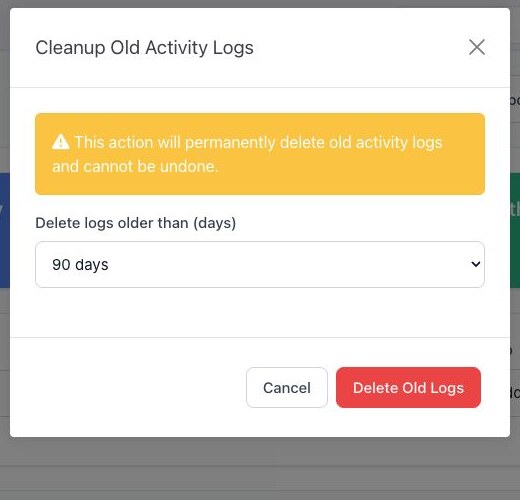
- Select Cleanup Old Logs.
- Choose whether to delete logs older than 30, 60, 90, 180, or 365 days.
- Review the warning and selected period carefully.
- Select Delete Old Logs only when you are certain the older history is no longer required.
After cleanup, BoardSite records a new activity-log entry describing the cleanup and reports how many older records were deleted.
If you are unsure #
Select Cancel and do not proceed. Ask your organization’s records owner or BoardSite administrator to confirm the retention policy first.


