
Activity Logs provide an audit trail of organization activity for authorized administrators and auditors. Available history and controls depend on your permission and the organization’s audit-log plan level.
Open Activity Logs #
- Sign in to BoardSite and select the correct organization.
- Select Activity Logs in the navigation menu.
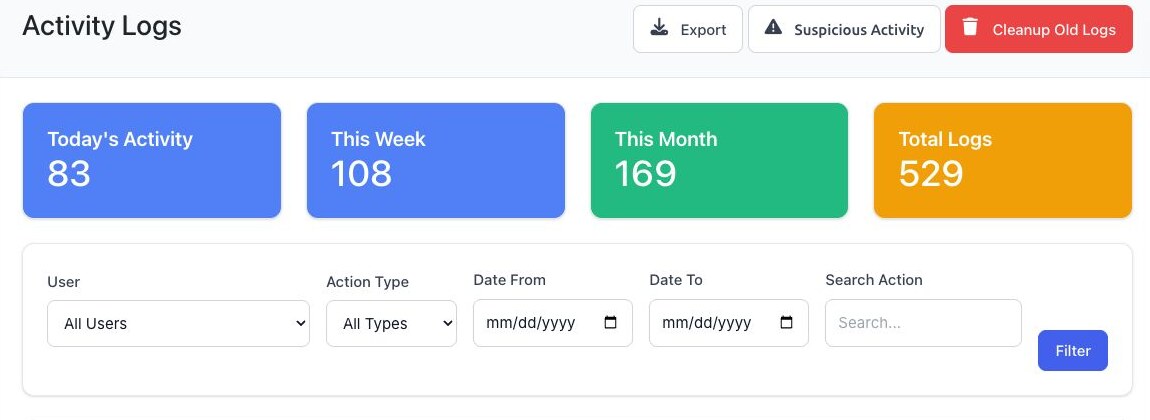
- Review the summary cards for today’s activity, this week, this month, and total logs.
Filter activity #
- Optionally select a User.
- Optionally select an Action Type: Authentication, Create, Update, Delete, or View.
- Optionally enter Date From and Date To.
- Optionally enter text in Search Action.
- Select Filter.
- Select the details control at the end of a row to review that log entry.
Select Suspicious Activity to review security patterns detected by BoardSite, such as concentrated failed login activity.
Export activity logs #
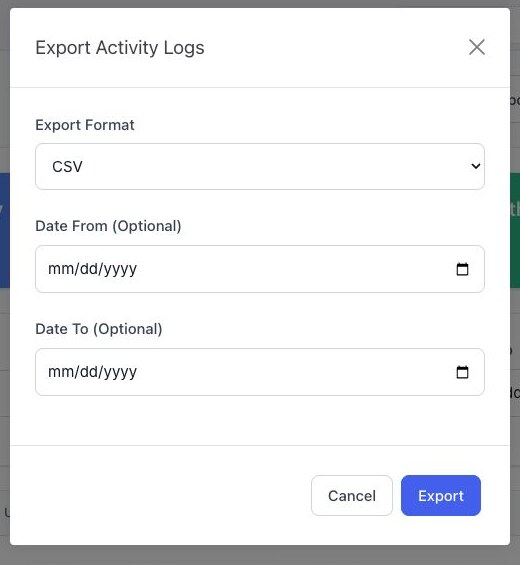
- Select Export.
- Choose CSV, Excel (XLSX), or PDF.
- Optionally enter a From and To date. Using a focused date range keeps the export manageable.
- Select Export to download the file.
Export limit: BoardSite limits a single activity-log export to 10,000 records. Use date filters when you need to export a large history.
Troubleshooting #
- If filters are unavailable, the organization may have basic audit-log access rather than the full audit trail.
- If Activity Logs is missing, ask a super administrator to verify your activity-log permission and plan access.
- If an expected event is missing, confirm the organization and date range. Not every activity outside BoardSite is recorded.


