
BoardSite can import files and folders from Google Drive, Microsoft OneDrive, or Dropbox. The provider must be connected before it can be selected on the import page.
Before you begin: You need document-upload permission, available document capacity, and an authorized cloud-storage connection. Connecting a provider may require administrator approval and the provider’s own consent screen.
Open cloud import #
- Open Documents → All Documents.
- Select Import from Cloud.
- Select Google Drive, OneDrive, or Dropbox.
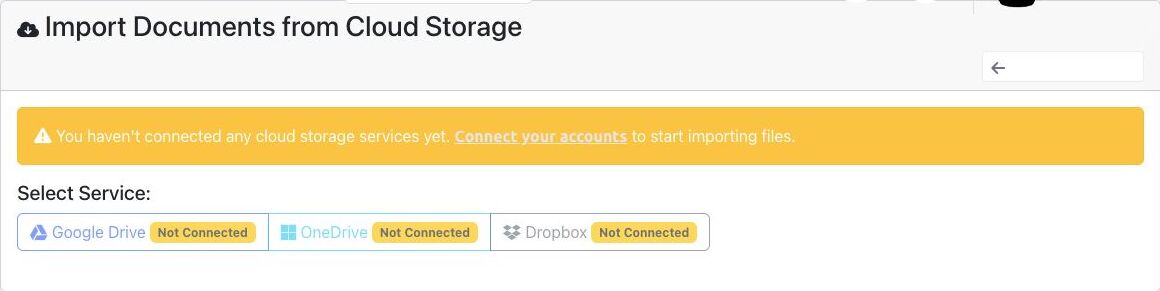
Connect a provider if needed #
- If every service is marked Not Connected, select Connect your accounts.
- On Integration Management, choose the appropriate provider and complete its authorization process.
- Return to Import from Cloud after the connection is confirmed.
Select and import content #
- Select the connected service. BoardSite loads its folders and files.
- Use the folder tree or breadcrumb to browse to the source location.
- Select the files or folders to import. Use Select All and Deselect All carefully.
- Under Import to Folder, choose the authorized BoardSite destination.
- Optionally enter comma-separated tags.
- Review the selected count, source items, and destination, then select Import Selected Items.
- Monitor Import Progress. When processing finishes, select Done and confirm the files in Documents Manager.
Security reminder: Import only files that belong in the selected BoardSite organization and destination. Cloud access does not override BoardSite visibility rules.
Troubleshooting #
- If a provider is disabled, reconnect it from Organization → Integrations.
- If files fail to load, refresh the connection and confirm that the provider account still grants access.
- If the import button remains disabled, select at least one item and a destination folder.
- If imported files are missing, confirm the destination folder, document capacity, and your visibility permissions.


