
AI Summary uses the meeting’s agenda items and documents to prepare a concise meeting summary. Use it as a review aid, not as a substitute for reading the source materials or approving official minutes.
Availability: AI Summary appears only when the feature is enabled for your organization and your account has access. The meeting needs useful agenda or document content for the best result.
Generate the summary #
- Open the meeting workspace.
- Select AI Summary.
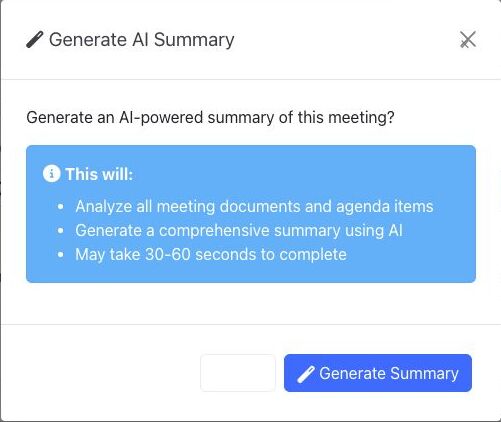
- Review the confirmation. BoardSite will analyze the meeting’s documents and agenda items, and generation may take 30-60 seconds.
- Select Generate Summary.
- Keep the dialog open while BoardSite prepares the result.
Review the result #
- Read the generated summary from beginning to end.
- Compare important dates, names, amounts, decisions, and action items with the agenda and source documents.
- If the meeting materials changed or the result is not useful, select Regenerate after correcting the source content.
- Use the approved source materials and your organization’s review process for any official communication or minutes.
AI content can be incomplete or inaccurate. A person familiar with the meeting must verify the summary before relying on or sharing it.
Troubleshooting #
- If AI Summary is missing, ask an organization administrator whether the feature and your permissions are enabled.
- If BoardSite reports that AI Summary is unavailable, contact your administrator rather than repeatedly retrying.
- If the result omits important context, improve the meeting’s agenda and documents, then regenerate the summary.


