
Integration Management shows which external services are available to the organization and whether each connection is active. It is available only when the user’s role includes integration-management permission.
Open Integration Management #
- Open Organization.
- Select Integrations.
- Review each provider’s status and listed capabilities.
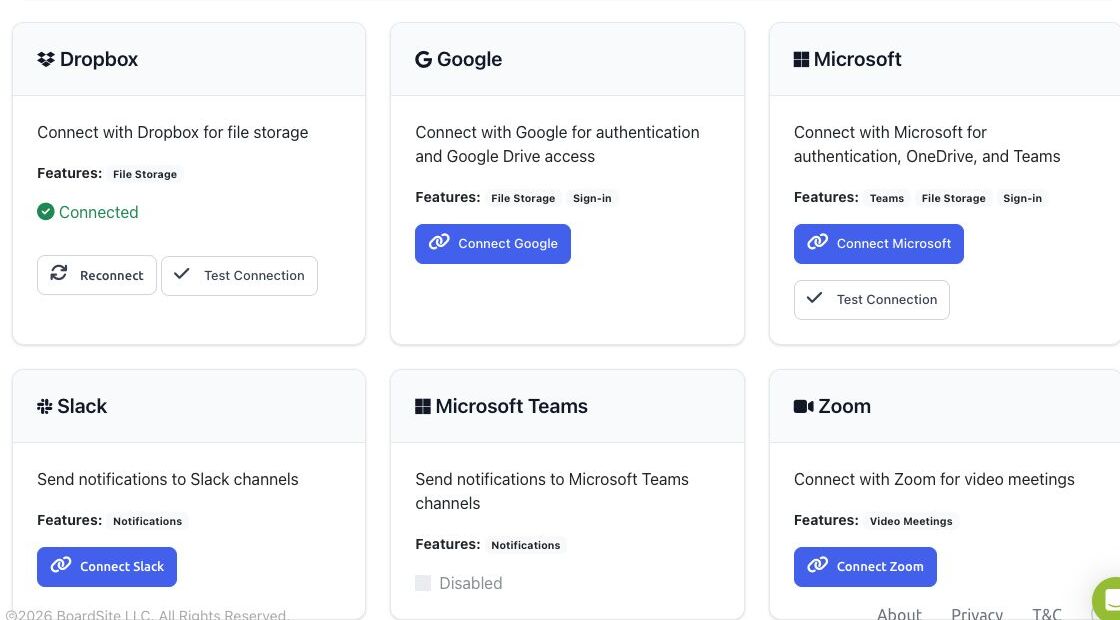
Connect or review a provider #
- Dropbox: file storage; a connected account can be reconnected or tested.
- Google: authentication and Google Drive access.
- Microsoft: authentication, OneDrive, and supported Microsoft features.
- Slack: notification delivery when enabled for the organization.
- Zoom: video-meeting connection.
Selecting Connect or Reconnect can leave BoardSite and begin the provider’s authorization flow. Use an organization-managed provider account and review the requested permissions before approving access.
A provider marked Disabled is not available for connection. Contact your BoardSite administrator or support team rather than attempting to work around the disabled state.


