
BoardSite provides a role-specific setup checklist. Administrators see organization-launch steps, while members see a shorter Get meeting-ready checklist.
Open the checklist #
- Open the Dashboard.
- Open the Organization setup panel when it appears. If it is minimized, use its arrow control to expand it.
- Review the completion counter and select an unfinished step to go to the relevant area.
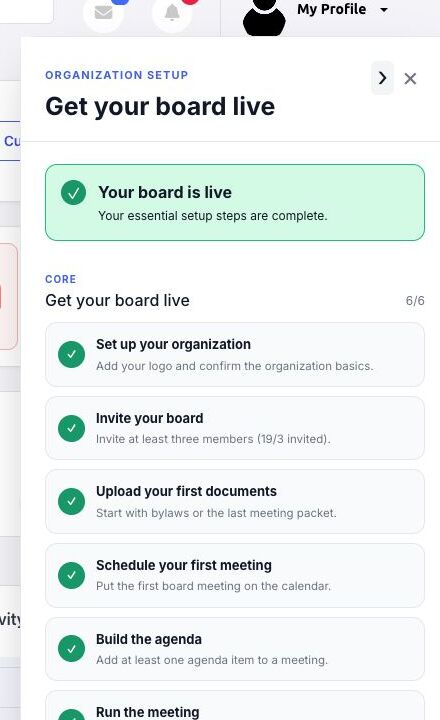
Administrator core setup steps #
- Set up your organization profile.
- Invite at least three board members.
- Upload the first documents.
- Schedule the first meeting.
- Add at least one agenda item.
- Complete the first meeting in BoardSite.
The administrator panel also contains optional next steps under Go further. Completing the core list marks the board as live; it does not remove or change any organization data.
Member core setup steps #
Members complete three actions under Get meeting-ready:
- Confirm contact information.
- Open a board document or meeting packet.
- Respond to an RSVP, vote, or survey.
After the third action, the panel shows You’re meeting-ready. Recommended member steps include reviewing the profile photo and enabling two-factor authentication.


